Classroom quizzes
Live quizzes for the classroom
Put a code on the projector, students join from their phones or school laptops, and you run a quick review or a revision game in the time it takes to take attendance.
What is Buzrr?
Buzrr is an open-source quiz platform that runs in the browser. A host builds a multiple-choice quiz — by hand or with AI — and opens a live room; players join from their own phones or laptops with a 6-character code, a link or a QR code, without creating an account. Signed-in users can also play ranked 1v1 quiz battles. Buzrr is licensed under AGPL-3.0, so anyone can read the code or run their own instance.
What teachers need from a quiz tool
A review quiz at the end of a lesson only works if getting 30 students into it takes seconds. Every step between "open this site" and the first question — creating accounts, installing an app, remembering passwords — eats into a period that is already short.
The other half is feedback. A quiz is most useful when you can see, question by question, where the class went wrong and talk about it before moving on.
How Buzrr fits a lesson
Joining takes one step
Students scan the QR code or type the 6-character code and pick a nickname. There are no student accounts to set up or manage.
You control the pace
Each question closes on its timer, or as soon as everyone has answered. The answer chart stays on screen until you click Next, so there is room to explain.
See where the class stands
The answer chart after each question shows how many picked each option. Wrong-answer clusters are your cue for a quick re-teach.
Draft questions from your notes
Upload a chapter PDF or your lesson notes to an AI Knowledge Space and generate questions that cite the passage they came from. Keep the good ones, export them to a quiz.
A 10-minute end-of-lesson review
- 1
Before class, create a quiz with 8–10 questions. Give recall questions 15 seconds and worked problems longer.
- 2
At the end of the lesson, click Host and put the QR code on the projector.
- 3
Wait for the lobby to fill; remove any joke nicknames with one click.
- 4
Run the questions. After each one, glance at the answer chart and address anything most of the class missed.
- 5
Show the final leaderboard. The results stay in your history if you want to compare next week.
Features that matter here
Live hosted quiz rooms
The host runs the room from one screen and moves it along question by question. Players join with a 6-character room code, a join link or a QR code.
No accounts for players
Players pick a name and an avatar and they are in. Only the host signs in (with Google).
Answer charts and leaderboards
When a question closes, the host screen shows how the room answered alongside the running leaderboard. Final results — rank, score and correct answers per player — are saved to the host's history.
Quizzes from your documents
Upload PDF, DOCX, TXT or Markdown files to an AI Knowledge Space. Generated questions cite the passage they came from, and you export the ones you keep into a quiz.
Room controls
Remove a player from the lobby or the live leaderboard, or ban them so they can't rejoin that room.
Reconnects keep scores
If a player's connection drops mid-game, they can rejoin and keep their score.
Tips from running it
- Turn on "Hide Questions" in the quiz editor before you project it, so students can't read ahead.
- Speed scoring rewards quick answers. For a low-stakes review, use generous timers so accuracy matters more than reflexes.
- If a student's Wi-Fi drops, they can rejoin the same room and keep their score.
Know the limits
- Buzrr has no homework or self-paced mode — every quiz is played live.
- There is no LMS or gradebook integration, and results are stored against nicknames, not student records.
- Questions are multiple choice with a single correct answer.
- The free plan hosts up to 50 players per room, which covers most classes.
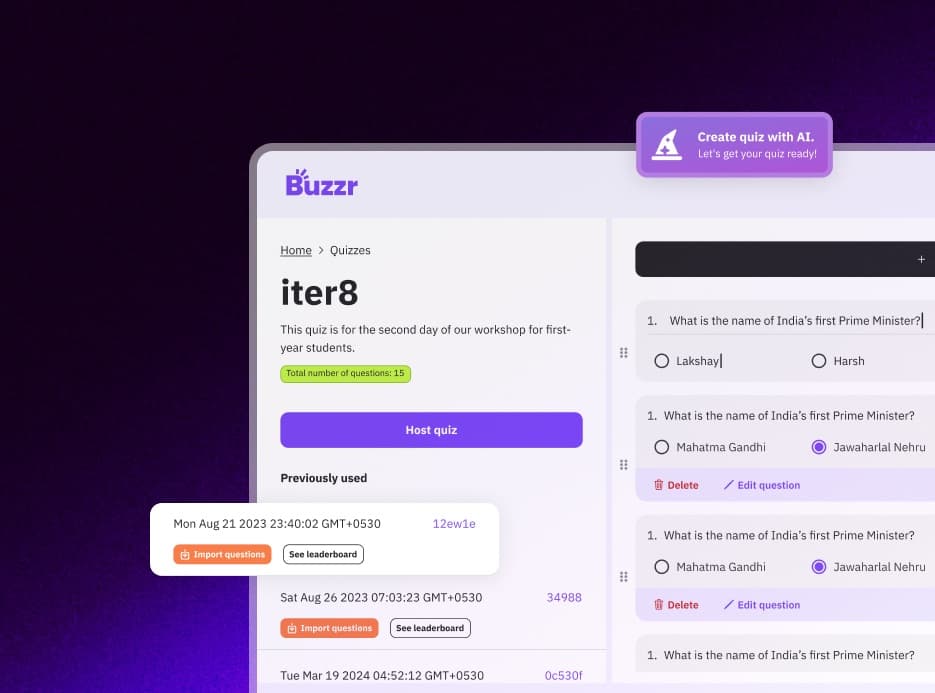
What it looks like
Coming from another tool?
- Kahoot! alternativeLive rooms with a code, speed scoring and leaderboards — open source, self-hostable, plus ranked 1v1 battles.
- Quizizz (now Wayground) alternativeFor people who used Quizizz for its live quiz game, now that it has become Wayground.
- Mentimeter alternativeA standalone quiz game instead of quiz slides inside a presentation.
Related use cases
- Quiz rounds for college fests and club eventsFest quiz rounds, society inductions, freshers' nights, hackathon breaks — Buzrr gets a hall full of people answering on their own phones with one QR code on the screen.
- Quiz your audience, liveClose a talk with a five-question quiz, run a trivia segment on a livestream, or warm up a meetup crowd. The audience joins from their phones; the leaderboard does the rest.
- Trivia nights without the answer sheetsWhether it's a regular pub quiz or a trivia night over video call, Buzrr does the marking and the leaderboard so the quizmaster can concentrate on the banter.
- Buzrr as an open-source quiz platformWhat's in the AGPL-3.0 codebase, how it's built, and how to contribute.
- Run a self-hosted quiz serverWhat you need to run your own Buzrr instance, and what changes when you do.
Try it with your group
Buzrr is free to start. Build a quiz, open a room and have people join from their phones.