Corporate training
Knowledge checks for training sessions
Turn a training document into a live quiz at the end of the session: generate questions from the material, check what landed, and keep the whole thing on your own servers if you need to.
What is Buzrr?
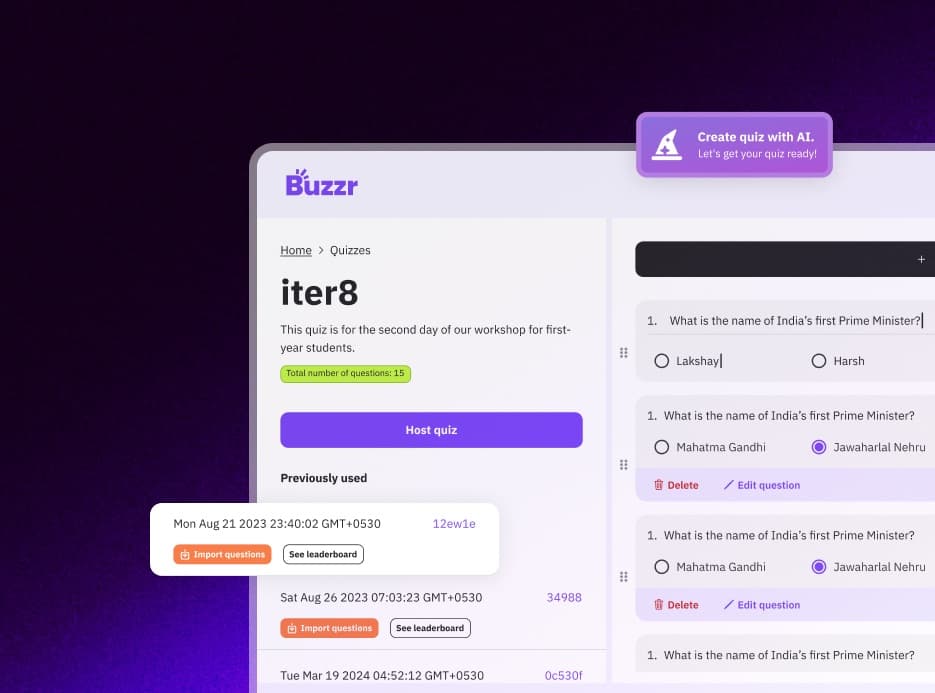
Buzrr is an open-source quiz platform that runs in the browser. A host builds a multiple-choice quiz — by hand or with AI — and opens a live room; players join from their own phones or laptops with a 6-character code, a link or a QR code, without creating an account. Signed-in users can also play ranked 1v1 quiz battles. Buzrr is licensed under AGPL-3.0, so anyone can read the code or run their own instance.
Why training quizzes are hard to keep up
Writing good check questions for every onboarding deck, policy update or product briefing takes time trainers rarely have. So the quiz gets skipped, and nobody learns which parts of the session did not land.
For many teams there is a second problem: the training material is internal, and uploading it to yet another SaaS tool needs a security review.
How Buzrr helps trainers
Questions drafted from your material
Upload the deck export, policy PDF or handbook page to an AI Knowledge Space. Buzrr generates questions grounded in the document, each with a citation to the source passage, so reviewing them is quick.
A live check, not a form
Run the questions live at the end of the session. The per-question answer chart shows which topics need a follow-up.
Self-host when data can't leave
Buzrr is AGPL-3.0 open source. You can deploy it on your own infrastructure with your own database, Redis and AI key, and inspect exactly what it does with uploaded documents.
From policy PDF to live quiz
- 1
Create a Knowledge Space for the course and upload the source documents (PDF, DOCX, TXT or Markdown).
- 2
Generate a batch of questions and review each one against its cited passage.
- 3
Export the questions you keep into a quiz and adjust the time limits.
- 4
At the end of the session, host the quiz; participants join by link from the meeting chat or by QR in the room.
- 5
Use the answer chart to decide what to recap, and keep the results in your history.
Features that matter here
Quizzes from your documents
Upload PDF, DOCX, TXT or Markdown files to an AI Knowledge Space. Generated questions cite the passage they came from, and you export the ones you keep into a quiz.
AI quiz generation
Describe a topic and Buzrr drafts up to 15 multiple-choice questions with Google Gemini. Edit anything before you host.
Live hosted quiz rooms
The host runs the room from one screen and moves it along question by question. Players join with a 6-character room code, a join link or a QR code.
Answer charts and leaderboards
When a question closes, the host screen shows how the room answered alongside the running leaderboard. Final results — rank, score and correct answers per player — are saved to the host's history.
Self-hostable
Run your own instance on your own infrastructure. Self-hosted instances run with billing off and Pro limits.
No accounts for players
Players pick a name and an avatar and they are in. Only the host signs in (with Google).
Tips from running it
- Paste the join link into the meeting chat for remote attendees; they play in a browser tab next to the call.
- Keep AI-generated questions honest: check each one against its citation before exporting.
- On the free plan you get 3 AI generations in total; Pro includes 10 a week.
Know the limits
- There is no SSO, LMS or HRIS integration, and participants are guests — results are not tied to employee records.
- No completion tracking or certificates: Buzrr is a live quiz tool, not a learning management system.
- Hosts sign in with Google.
What it looks like
Coming from another tool?
Related use cases
- Quick quizzes for team buildingA Friday quiz, an all-hands icebreaker, an offsite warm-up. Drop the join link in chat and the whole team is playing inside a minute, remote or in the room.
- Quiz your audience, liveClose a talk with a five-question quiz, run a trivia segment on a livestream, or warm up a meetup crowd. The audience joins from their phones; the leaderboard does the rest.
- Live quizzes for the classroomPut a code on the projector, students join from their phones or school laptops, and you run a quick review or a revision game in the time it takes to take attendance.
- Buzrr as an open-source quiz platformWhat's in the AGPL-3.0 codebase, how it's built, and how to contribute.
- Run a self-hosted quiz serverWhat you need to run your own Buzrr instance, and what changes when you do.
Try it with your group
Buzrr is free to start. Build a quiz, open a room and have people join from their phones.